|
Experience
the dynamics and benefits of GROUP INTERACTION on the web. Around the office, around the corner and around the world. |
 |
Web
Collaboration FAQ Revision #32 - 01/01/2007 |
 |
These notes should help you get through any questions you may have. We would appreciate our feedback as to whether your specific question(s) were resolved by these FAQs. Let us know your unanswered questions we'll add them to the FAQ. Most your questions will be answered when you attend one of our orientations.
To
register for an orientation, click here or
call us at (773)-463-2288. Please leave your name and a call back
number if go go into voice mail.
#1 What is the WebIQ environment?
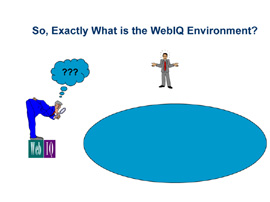
WebIQ provides a collaborative environment for groups needing to get work done when they are unable to meet face-to-face and it helps them work more efficiently when they are face to face.
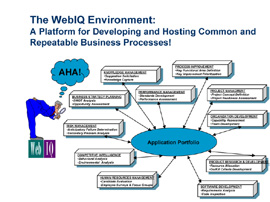
Use it on the web or in the meeting room to:
- engage groups in interactive work processes
- harness & focus the power of group interaction
#2 How does Web Collaboration work?
Imagine working interactively with people around the office, around the country and around the world - without the hassles and disruption of travel!:
- Web Collaboration is doing real group work on the internet and goes far beyond the more common practices of Web Conferencing such as broadcasting presentations, polling single questions and sharing application controls.
- In order to see how it works, I would like to invite you to attend one of our free, 1-hour orientations on web-based collaboration so that you could experience things first-hand - i.e. take a test drive.
- To
register for an orientation, click here or
call us at (773)-463-2288. Please leave your name and a call back number if go go into voice mail
#3 Isn't this the same
as Web Conferencing?
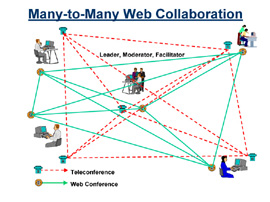
Click for An Enlarged Image

Web Conferencing and Web
Collaboration are different!:
- Web Collaboration
- Provides participants with interactive, many-to-many collaboration as shown in the diagram to the left.
- Provides for interactive
group activities such as:
- Brainstorming, list development, issue analysis, list reduction, categorization, prioritization, allocation, single and multi-criteria voting, collaborative authoring, surveying, on-demand access to and reporting of activities, etc.
- Enables groups separated
by distance and time to participate in key business processes such
as strategy planning and post mortem reveiws, as well as in repetetive
processes such as project status meetings, candidate evaluation
and software code inspection.
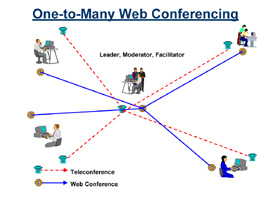
- Web Conferencing
- Provides participants with one-to-many communictaton as shown in the diagram to the left.
- Provides for activities
such as:
- Broadcasting presentations, polling single questions, sharing of application screens and controls, recording and playback of conference
- Web Conferencing environments
include:
- WebEx, Live Meeting, Intercall, Genesys,E-Space, Raindance, NetMeeting...
- Web Collaboration Plus
Web Conferencing
- Web Collaboration provide
and Web Conferencing provide excellent complements to each other
- Web Collaboration for interactive group work
- Web Conferencing for broadcasting presentations and data sharing
- Web Collaboration provide
and Web Conferencing provide excellent complements to each other
#4 How can I try this?
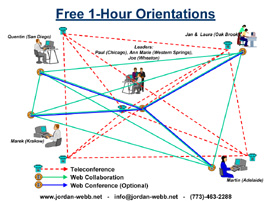
Test driving is easy and it's free!
- Register for a free 90-minute
orientation at:
http://www.webcollaboration.biz/schedule - For the web conference, all you need is a PC/Win-98 or better, a high-speed web connection, and a browser (Internet Explorer, Netscape, Mozilla). There are no plug-ins to install or client software to download, and there are no firewall issues to deal with.
- For the teleconference, you need a phone line. A toll free dial in number is available
#5 When would I use this in distributed mode?
Synchronously
- from different locations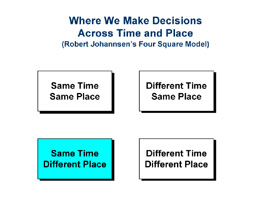
Click for An Enlarged Image
In Distributed Mode - At the Same Time, from Different Places
- Gathering input to make a decision or solve a problem, etc. Participants work synchronously, at the same time but from different places.
- With teleconference and web conference, participants use a mix of verbal and electronic conversation to build session deliverables.
- Participants submit ideas, comments and votes simultaneously via computer, thus not having to wait their turn. Participation can be attributed or anonymous.
- Session leaders manage process and data flows between activities. Detailed reports of session work are available on demand.
- Example: We recently facilitated a strategy planning session for a 10-person team distributed across the U.S., Europe and Australia. Our client achieved an across the board 50% reduction in team project time (approximately 1 staff month).
#6 When would I use this in virtual mode?
Asynchronously
- from different locations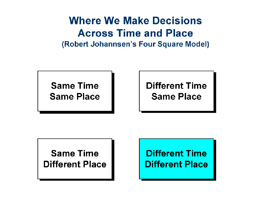
Click for An Enlarged Image
In Virtual Mode - At Any Time, from Any Place:
- Gathering input to make a decision or solve a problem, etc. Participants work asynchronously, at any time and from any place.
- Reaction to ideas and comments occurs asynchronously as participants see each other's work added to the web conference but there is no teleconference and no verbal interaction.
- Session leaders monitor participation and provide assistance. Detailed reports of session work are available on demand.
- Example: The participants in the above distributed strategy planning session were given a pre-work assignment - namely, within a time box of 10 days, they were to submit their individual goals and objectives for the upcoming year. They were also asked to add comments and pose questions to everyone else's goals and objectives. Participants also did interim work between the multiple distributed sessions.
#7 When would I use this in face-to-face mode?
Synchronously
- in the same location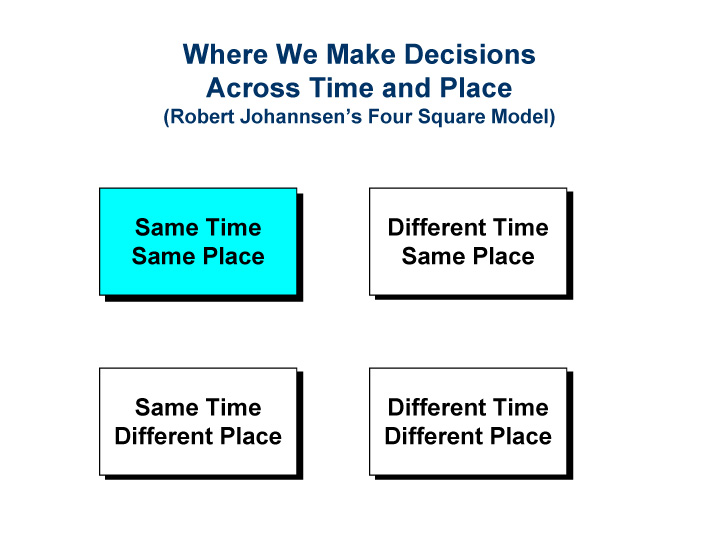
Click for An Enlarged Image
Face-to-face Mode - At the Same Time in the Same Place:
- Gathering input to make a decision or solve a problem, etc. Participants are located in the same room and use a combination of verbal and electronic conversation to build session deliverables.
- Participants submit ideas, comments and votes simultaneously via computer, thus not having to wait their turn. Participation can be attributed or anonymous.
- Session leaders manage process and data flows between activities.
- Detailed reports of session work available on demand.
- Example: We facilitated a session for a client using our portable 30-notebook network in their research facility. The client brought internal and external experts from around the world to the facility to determine possible applications for a new material. Participants immediately saw their ideas, comments and votes recorded in the system and were able to discuss and modify them as needed. Participants developed a large number of applications, established a set of evaluation criteria and prioritized the applications against the criteria.
- Note: This session also included virtual pre-work to gather initial ideas from experts (including those who could not attend face-to-face) and to start everyone thinking about new applications so that the meeting would begin more productively.
#8 What is the "ideal" type of project for WebIQ?
Synchronously
- in the same location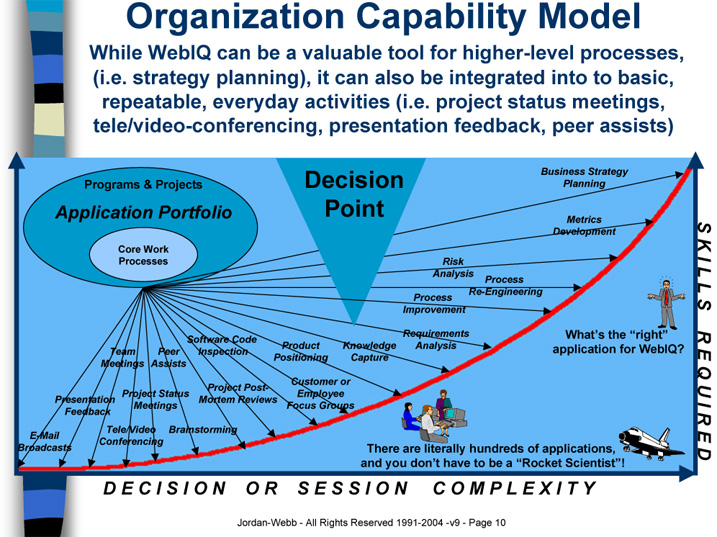
Click for An Enlarged Image
The "Ideal" Project:
- WebIq is not a silver
bullet to solve all problems and there is no single ideal project for
which it is best suited
- It can support simple processes that require low levels of group skills
- It can support complex processes that require high levels of team maturity
- Any initiative, program,
project or activity that engages people and requires collaboration is
potentially a great applicaiton for WebIQ.
- Situations where key
drivers include:
- operating within constrained travel budgets
- removing/reducing cost from business processes
- reducing concept to market time
- shortening problem solving time
- decreasing decision cycle time
- Situations where key
objectives include:
- working with distributed stakeholders (same time-different place)
- teaming in virtual mode (any time-any place)
- Situations where key
drivers include:
- Challenge and stretch an organization's capability, but with a plan
#9 How could I get access to this on the web?
Application
Service Provider Environment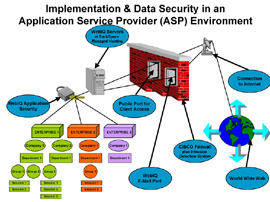
Click for An Enlarged Image
Application Service Provider Environment:
- An example of the Application Service Provider (ASP) environment is illustrated on the slide to the left and is based on WebIQ, LLC,s hosting arrangement with Rackspace Managed Hosting.
- Rackspace Managed Hosting provides web hosting services to enterprises of all sizes. They supply all the servers, software, bandwidth and management needed to run almost any hosted application - from Internet to enterprise. Rackspace is one of the largest companies in the Web hosting market today, with more than 550,000 domains and over 4,000 customers world-wide. The fact that Rackspace hosts over 1,600 servers belonging to major corporations and government entities attests to their level of security.
- Rackspace runs four state-of-the-art, secure data centers - two in San Antonio, Texas, one in Herndon, Virginia, and one in London, England. They are equipped with the very latest technology and maintained to telco standards by expert network engineers to ensure maximum security and uptime for customers' servers. They use biometric hand scanners and passcards to restrict access to their data centers, and only highly-trained, level three technicians are allowed into the controlled environment in which the servers are housed.
- Their fast, reliable network is powered by UUNET, AT&T, Sprint, Qwest and SBC to ensure maximum network uptime - and has been running at 100% for the last two years. For an more details about Rackspace: http://www.rackspace.com/aboutus/corporate_overview.php
- Whenever considering whether or not the ASP model offers sufficient levels of security for an application that could compromise extremely sensitive corporate or government information, WebIQ and its network of associates recommend that clients first consult with their own in-house security experts and with the Rackspace Managed Hosting (ASP Host) security experts.
#10 How could I use this in-house, within the security of our firewall?
Internal
Intranet Environment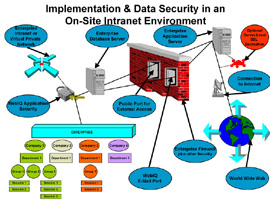
Click for An Enlarged Image
Internal Intranet Environment:
- The alternative to using WebIQ via the ASP model is to implement WebIQ on-site, within the protection of an enterprise’s existing firewalls and other security and intrusion detection schemas. WebIQ supports Server-Level SSL (Secured Socket Layer) Encryption which further enhances security. However, any encryption-decryption schema will degrade performance and impact response times. WebIQ may be implemented for internal use only on an intranet, virtual private network or stand-alone server. Such configurations may be designed to permit controlled access to WebIQ by external users via a public port.
- An example of an On-Site Intranet environment is illustrated on the slide to the left and is based on Northrup-Grumman Corporation’s implementation where WebIQ data resides on servers behind the corporate firewall while the WebIQ application resides on servers outside of the firewall.
- This arrangement provides the best of both possible worlds, i.e., anyone inside or outside of the firewall who is invited to a meeting can participate. However, the data is protected behind the firewall.
#11 How could I use this without being connected to the internet?
Portable
Stand-Alone Server Environment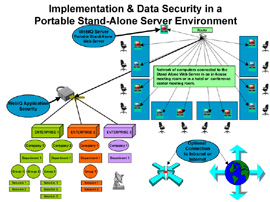
Click for An Enlarged Image
Portable Stand-Alone Server Environment:
- An example of a Portable Stand-Alone Server environment is illustrated on the slide to the left and is based on the operation of a group of WebIQ Business Partners who jointly own a portable stand-alone server and who developed and implemented the concept.
NOTE 2: Click here to view the current WebIQ Orientation Instructions
NOTE 3: Click here to view the current WebIQ Orientation Invitation